Help
Find your ad account ID, platform by platform
- Google Ads customer ID 123-
456- 7890 - Google Merchant Center Merchant Center ID 123456789
- Microsoft Ads account number F1234567
- Meta Ads ad account ID 123456789012345
- LinkedIn Ads account ID 512345678
- TikTok Ads ad account ID 7123456789012345678
- Snapchat Ads Ad Account ID 1a2b3c4d-
1a2b- 1a2b- 1a2b- 1a2b3c4d5e6f - Reddit Ads account ID a2_k7x4p9qz2
The Google Ads, Meta and Microsoft Ads screenshots come from real accounts, with names and numbers replaced by examples. The Google Ads and Meta screenshots show the Dutch interface.
Google Ads: find your customer ID
What it looks like: 10 digits, shown in Google Ads as 123-456-7890. With or without dashes, both work.
- Sign in at ads.google.com with the Google Account that has access to your ad account.
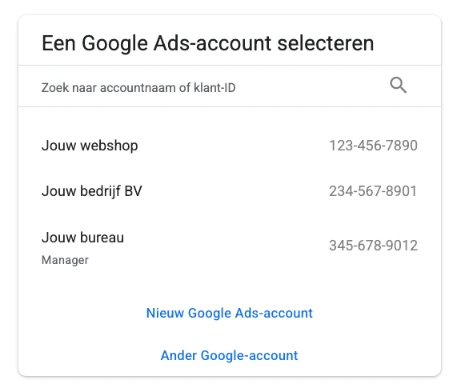
- If you have access to more than one account, you first see a list of all accounts and their customer IDs. Choose the account your campaigns run in.
- Inside the account, your customer ID is at the top right, next to your profile picture, together with the name of the account you are viewing.
- Does it say "Manager" under an account? Then that is a manager account (MCC), usually an agency's. It also has 10 digits, but I don't need that number: take the customer ID of your company's own account.
- Can't sign in? The customer ID also appears in earlier emails and billing statements from Google Ads.

Not to be confused with
- Codes that start with AW-, G- or GT- are tag IDs for tracking, not a customer ID.
- A payments profile ID (12 digits) or payments account ID (16 digits) is also a different number.
Does your agency manage the account?
Ask your agency for the customer ID of the account your campaigns run in, and make clear you do not mean the ID of their manager account. Google requires parties that advertise on behalf of clients to provide that customer ID on request.
Ask for Admin access for your own Google Account at the same time. Only an admin can give access to a new specialist later on. If the agency created the account from its own manager account, that manager account is listed as the owner. You can see this under Admin, Access and security, on the Managers tab.
Sample email to your agency
Hi [name],

Could you send me the Google Ads customer ID of our account, the account our campaigns run in? I mean the 10-digit number of our own account, not the one of your manager account.

Could you also invite my Google Account [email address] with the Admin access level? You can do that under Admin, Access and security.

Thanks in advance,
[name]
Next: give view-only access
An admin on the account goes to Admin, Access and security, Users tab, clicks the plus button, enters my email address, chooses the Read-only access level and clicks Send invitation. That lets me view campaigns and reports, but not change anything.
Sources for Google Ads
- Find your Google Ads customer ID (opens in a new tab)
- Manage accounts from a manager account (opens in a new tab)
- Third-party transparency requirements (opens in a new tab)
- Share access to your Google Ads account (opens in a new tab)
- Access levels in Google Ads (opens in a new tab)
- Account ownership through a manager account (opens in a new tab)
Google Merchant Center: find your Merchant Center ID
What it looks like: Digits only, such as 123456789, without dashes. In your browser's address bar, it comes after a=.
- Sign in at merchants.google.com with the Google Account that has access to your store.
- The Merchant Center ID is at the top of the page, next to the name of your account.
- Or look at your browser's address bar: the number after a= is your Merchant Center ID.
- Do you use an advanced account for multiple stores? Then first open the store I am allowed to view. Each store has its own ID as a sub-account.
Example of the address bar: merchants.google.com/mc/overview?a=123456789
Not to be confused with
- Your Google Ads customer ID has 10 digits, such as 123-456-7890, and belongs to Google Ads. That is a different number.
- With an advanced account, the main account also has its own ID. Send the ID of your store's sub-account.
- The ID of your Google Business Profile and the merchant ID of your Google payments profile are also different numbers.
Does your agency manage the account?
Ask your agency for your store's Merchant Center ID. If the agency set up your store as a sub-account under its own advanced account, the agency has full access. In that case, ask for the ID of your store's sub-account.
Ask for Admin access for your own Google Account at the same time. An admin can only remove themselves if there is another admin. When you switch agencies, also check that your website verification is not tied to a user at the agency.
Sample email to your agency
Hi [name],

Could you send us the Merchant Center ID of our store? That is the number after a= in the Merchant Center address bar. If our store is a sub-account under your own account, I mean the ID of that sub-account.

Could you also add my Google Account [email address] with the Admin access type? You can do that in the Merchant Center settings, on the People and access tab.

Thanks in advance,
[name]
Next: give view-only access
An admin opens the settings in Merchant Center, goes to the People and access tab and chooses Add person. Enter my email address and choose Read-only, with Performance and insights added for the reports. If you only see Admin and Standard when inviting, choose Standard and change my access type to Read-only next to my name after the invitation. That way I can view products, feeds and reports without being able to change your product data or settings.
Sources for Google Merchant Center
Microsoft Ads: find your account number
What it looks like: 8 characters, a mix of letters and digits, such as F1234567. The digits-only account ID, after aid= in the address bar, also works.
- Sign in at ads.microsoft.com.
- At the top left, next to the logo, you see the name of your account with the account number in parentheses.
- Click that account picker to see all your accounts with their numbers. A 10-character number is your manager account number: linking with it gives access to all accounts under it, so choose the 8-character account number instead.
- Or open Tools, All accounts, Accounts summary: the account number is next to the account name. If your interface is in Dutch, the menu names may differ slightly.

Not to be confused with
- The number after cid= in the address bar is your customer ID, not your account number.
- Microsoft calls the account number an 8-digit code, but it contains letters as well.
Does your agency manage the account?
Ask your agency for the account number (8 characters), the manager account number (10 characters) and who pays the bill.
If the agency created the account under its own manager account, Microsoft says it cannot be separated from that agency. The agency can still invite your specialist as a user. In the long run, the cleanest solution is an account of your own that an agency links to.
Sample email to your agency
Hi [name],

Could you send us the account number of our Microsoft Ads account? It is the 8-character code of letters and digits in parentheses after the account name, at the top left in Microsoft Advertising.

Could you also let us know which manager account the account is under and who pays the bill? And could you invite [email address] as a user with the Viewer role for this account?

Thanks in advance,
[name]
Next: give view-only access
Someone with admin rights goes to Settings, User management, Invite user, enters my email address, chooses the Viewer role and limits access to the right account. Viewer means read-only. A link request is never read-only: it gives full control, so for a Quick Scan an invitation as Viewer is the right route.
Meta Ads: find your ad account ID
What it looks like: Digits only, a long string such as 123456789012345. In your browser's address bar, it comes after act=.
- Open Meta Ads Manager at adsmanager.facebook.com.
- At the top left, next to Campaigns, is the menu with the name of your ad account. The number in parentheses is your ad account ID. Click the menu to see your other ad accounts.
- Or look at your browser's address bar: the number right after act= is your ad account ID.
- Do you use Meta Business Suite? Then all your ad accounts are listed under Settings, Accounts, Ad accounts.

Example of the address bar: adsmanager.facebook.com/adsmanager/manage/campaigns?act=123456789012345&business_id=…
Not to be confused with
- The number after business_id= in the same address bar is your business portfolio ID, formerly the Business Manager ID. That is a different number.
- A Page ID or a pixel or dataset ID is not your ad account ID either.
Does your agency manage the account?
Ask your agency for the ad account ID and which business portfolio the account is in. If the account is in your own portfolio, someone on your side with full control can look up the ID and grant access themselves.
If the agency created the account in its own business portfolio, it stays there: Meta does not let you move such an account to another portfolio. The agency can share it with your business portfolio through partner access, though.
Sample email to your agency
Hi [name],

Could you send us the Meta ad account ID of the account our ads run in? That is the number after act= in the Ads Manager address bar, or the number next to the account name at the top.

Could you also let us know which business portfolio the account is in? And could you share the account with business portfolio ID [ID] via Settings, Users, Partners, with the View performance task?

Thanks in advance,
[name]
Next: give view-only access
If the account is in your own business portfolio, someone with full control gives me partner access: Meta Business Suite, Settings, Users, Partners, Add, with my business portfolio ID, then partial access with only the View performance task. If it is in your agency's portfolio, the agency has to give me that access: you cannot pass on an account that was shared with you. If the account has no business portfolio, it can be done through Ad account settings, Ad account roles, with the Analyst role. For that, we do need to be friends on Facebook. With all of these routes I can view ads and reports, but not change anything.
LinkedIn Ads: find your account ID
What it looks like: 9 digits, such as 512345678, without dashes. You find it under the name of your ad account.
- Sign in to LinkedIn and open Campaign Manager at linkedin.com/campaignmanager. In the Dutch interface it is called Campagnebeheer.
- Open the ad account your campaigns run in.
- At the top left you see the name of the account, with the 9-digit account ID below it.
- Have more than one account? Click the account name at the top left and then View all accounts, at the bottom of the menu on the left. The ID is shown under each account name.
Not to be confused with
- A campaign ID, campaign group ID or ad ID can also have 9 digits. Take the number under the account name at the top left, not a number from the list of campaigns.
- The partner ID of your Insight Tag, your Business Manager ID and the number of your company page (in the address bar after /company/) are also different numbers.
Does your agency manage the account?
Ask your agency for the 9-digit account ID. Whoever creates the account automatically becomes Billing admin. So if someone at your agency created it, the agency is in control.
That is why you should also ask for the Account manager role for someone on your own team. Only an account manager can give others access. The Billing admin role can be transferred to you later. The account then pauses until the new payment details are added.
Sample email to your agency
Hi [name],

Could you send us the account ID of our LinkedIn Ads account? That is the 9-digit number under the account name, at the top left in Campaign Manager.

Could you also add my LinkedIn profile [link to profile] with the Account manager role? You can do that via Account Settings, Manage access, Add user. If the account is in Business Manager, it is done there.

Thanks in advance,
[name]
Next: give view-only access
Someone with the Account manager role opens Account Settings, Manage access in Campaign Manager and clicks Add user. Search for me by name or through my LinkedIn profile and choose the Viewer role. That lets me see campaigns and results without being able to change anything. LinkedIn does require us to be connected on LinkedIn, as a 1st, 2nd or 3rd degree connection. If the account is in Business Manager, add me there instead of in Campaign Manager.
TikTok Ads: find your ad account ID
What it looks like: Digits only, a long string such as 7123456789012345678. In the address bar, it comes after aadvid=.
- Sign in to TikTok Ads Manager at ads.tiktok.com.
- Click your account name at the top right. The menu shows the ID of your ad account.
- Or look at your browser's address bar: the number after aadvid= is your ad account ID.
Example of the address bar: ads.tiktok.com/i18n/dashboard?aadvid=7123456789012345678
Not to be confused with
- Your Business Center ID is also a long string of digits. You find it in Business Center via your profile icon. For the Quick Scan, I need the ID from Ads Manager.
- A pixel code of capital letters and digits, a campaign ID and your TikTok App ID are also different numbers.
Does your agency manage the account?
Ask your agency for the ad account ID and which Business Center the account is in. If it is in the agency's Business Center, an admin there has to approve or share the access.
An account can move to your own Business Center. The agency starts that transfer and an admin on your side approves it. TikTok does not offer this to everyone, the balance does not move with the account and running campaigns pause during the transfer.
Sample email to your agency
Hi [name],

Could you send us the ad account ID of our TikTok account? That is the number after aadvid= in the TikTok Ads Manager address bar.

Could you also let us know which Business Center the account is in? And could you give [email address] access to this ad account, with Analyst permissions only?

Thanks in advance,
[name]
Next: give view-only access
If the account is in a Business Center, an admin adds me there via Users, Add Members, with my email address and the Standard role. Give me access to the ad account with Analyst permissions. Without a Business Center, I request access from my own Business Center, using your ad account ID. You approve that request in Ads Manager, under notifications, on the Business Center tab. With Analyst I can view ads, results and reports without being able to change anything.
Sources for TikTok Ads
Snapchat Ads: find your Ad Account ID
What it looks like: 36 characters: digits and the letters a to f, in five groups separated by dashes, such as 1a2b3c4d-1a2b-1a2b-1a2b-1a2b3c4d5e6f.
- Sign in to Snapchat Ads Manager at ads.snapchat.com.
- Open the menu in the top corner and choose Ad Accounts.
- The Ad Account ID is next to the name of your ad account. Copy it in full, including the dashes.
Not to be confused with
- Your Organization ID has the same format, but belongs to your organization. You find it under Business Details and also in the address bar of business.snapchat.com.
- A Snap Pixel ID or the ID of your Public Profile also looks similar. Take the ID shown next to the account name under Ad Accounts.
Does your agency manage the account?
An ad account belongs to an organization. If your agency created the account in its own organization, you are not automatically a member of it. An admin at the agency then grants the access.
Ask your agency for the Ad Account ID and for an invitation for me as a Member, with the Data Analyst role on the ad account.
Sample email to your agency
Hi [name],

Could you send us the Ad Account ID of our Snapchat ad account? It is in Ads Manager under Ad Accounts, next to the account name.

Could you also invite [email address] as a Member of the organization, with the Data Analyst role on this ad account?

Thanks in advance,
[name]
Next: give view-only access
An admin opens the menu in Ads Manager and chooses Members, then Invite Member. Enter the email address of my Snapchat account, which I will send you, and choose the organization role Member. Then assign me to the ad account with the Data Analyst role. That role can view results and cannot change anything. I confirm the invitation with Join in the email.
Reddit Ads: find your account ID
What it looks like: Starts with a2_ or t2_, followed by letters and digits, such as a2_k7x4p9qz2. Copy the whole ID, including a2_ or t2_.
- Sign in to Reddit Ads at ads.reddit.com.
- Open the Accounts page. It lists your ad account with the account ID.
- If you use Business Manager, you also find your ad accounts under Assets, Ad Accounts.
Not to be confused with
- Your Business ID is a long code with dashes, without a2_ or t2_. It is meant for partnerships between businesses, not for the Quick Scan.
- The Accounts page can also show your Pixel ID, sometimes in the same format with a2_ or t2_. Take the ID shown with the name of your ad account.
Does your agency manage the account?
An ad account belongs to a business in Reddit Ads. Ask your agency for the account ID and which business the account belongs to.
An account can only be shared with one partner at a time. If your agency is already that partner, an admin of the business that owns the account invites me as a member.
Sample email to your agency
Hi [name],

Could you send us the account ID of our Reddit Ads account? It starts with a2_ or t2_ and is shown on the Accounts page in Reddit Ads.

Could you also let us know which business the account belongs to? And could you invite [email address] with the Member business role and the Analyst role on this ad account?

Thanks in advance,
[name]
Next: give view-only access
An admin opens Business, Users in Reddit Ads and chooses Invite new members. Enter my email address, choose the Member business role and click Next. Then choose the ad account with the Analyst role. That is the role with the fewest permissions: viewing reports and results, without being able to change campaigns, audiences or payment details. If your business has a list of allowed email domains, add my domain to it first.
Got the number?
Enter it in your request. If you get stuck, ask your question through the contact form. No account ID is needed there, and we will figure it out together.
Frequently asked questions
Is it safe to share my account ID?
Yes, with someone you trust. The ID is not a password: nobody gets access to your account until you, or someone who already has access such as your agency, approves an invitation or link request. Google recommends sharing the ID only with people you trust. So do not post it publicly online, and only approve requests from parties you know.
What is the difference between my Business Manager ID and my ad account ID?
Your Business Manager ID, now called the business portfolio ID, belongs to your business in Meta Business Suite. Your ad account ID belongs to the account your ads run in and are paid from. For a Quick Scan I need the ad account ID: the number after act= in the Ads Manager address bar.
My agency manages the account. Can I ask for the ID?
Yes. The account runs on your budget, so you have every right to know which account it is. For Google Ads it is even a formal requirement: parties that advertise on behalf of clients must provide the customer ID on request. Use the sample email on this page. For Google Ads, ask for admin access for your own account at the same time.
I have several accounts. Which ID do I send?
The ID of the account running the campaigns you want reviewed, usually the account that incurs the costs. For Google Ads, do not send the number of a manager account, for Meta not your business portfolio ID and for Microsoft Ads not your 10-character manager account number. In TikTok the Business Center ID is a different number, as is the Organization ID in Snapchat and the ID of a main account in Merchant Center. If in doubt, send the numbers you see and note which account is which.
Do you need a password or login?
No, never. For a Quick Scan or audit I ask for view access with as few permissions as possible: Read-only in Google Ads and Merchant Center, View performance in Meta, Viewer in Microsoft Ads and LinkedIn, Analyst in TikTok, Data Analyst in Snapchat and Analyst in Reddit, the role with the fewest permissions. So you do not share any login details, and I cannot change campaigns, budgets or payment details. Afterwards, you revoke the access yourself or have your agency do it.
Why does the form not ask for an ID for ChatGPT Ads and programmatic?
For ChatGPT Ads, OpenAI does not yet describe a fixed format for an ad account ID. For programmatic, it depends on the buying platform you use. That is why we agree on which account I can view in my personal email after your request.
Steps checked against the official help and documentation of each platform: Google Ads, Meta and Microsoft Ads on October 9, 2026, and Merchant Center, LinkedIn, TikTok, Snapchat and Reddit on October 13, 2026. Platforms change their menus regularly. If you see something different, please let me know.